


transaction log – How to shrink log file for Azure SQL Database?
My Azure Sql Database transaction log file is about 1 TB in size, but only 1 GB is in use:
SELECT file_id, name, type_desc,
CAST(FILEPROPERTY(name, 'SpaceUsed') AS decimal(19,4)) * 8 / 1024. AS space_used_mb,
CAST(size/128.0 - CAST(FILEPROPERTY(name, 'SpaceUsed') AS int)/128.0 AS decimal(19,4)) AS space_unused_mb,
CAST(size AS decimal(19,4)) * 8 / 1024. AS space_allocated_mb,
CAST(max_size AS decimal(19,4)) * 8 / 1024. AS max_size_mb
FROM sys.database_files;
Results:
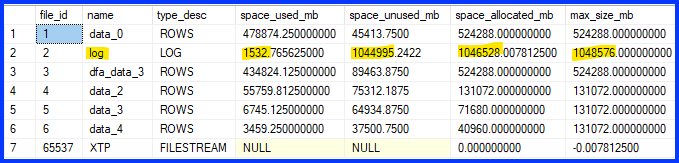
I’m trying to cut it down to 50 GB in size, but neither of these seem to have any effect, the space_unused_mb and space_allocated_mb values remain the same:
DBCC SHRINKFILE (2, truncateonly);
DBCC SHRINKFILE (2, 50000);
Or am I barking up the wrong tree here? Does log file size count against storage cost?
Read more here: Source link