


Using Java with USB Data Acquisiton Products
This page describes how to use the Microsoft Visual Studio .NET compiler to build the
AduJava demo.
You will have to adjust the setpath.bat and compile.bat command files to reflect the
locations of the software on your computer.
For my environment the setpath.bat looks like this:

For my environment the compile.bat looks like this:

Note that the editor has wrapped the line. The file contains only one line.
Open a Visual Studio Dot Net Command Prompt window. (ie. Start | Programs | Microsoft
Visual Studio .NET | Visual Studio .NET Tools | Visual Studio .NET Command Prompt)
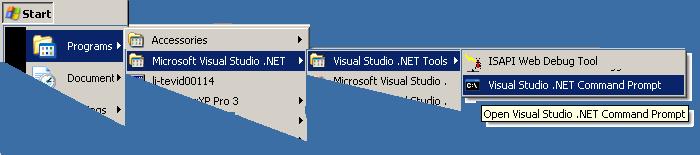
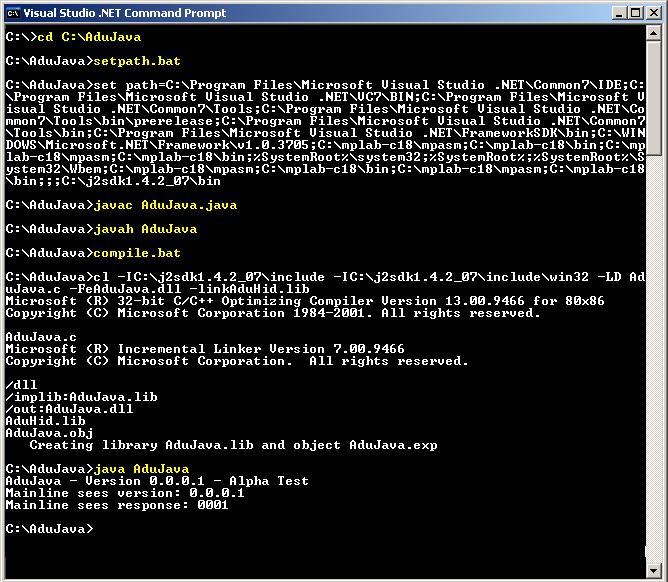
Enter the following commands at the command prompt.
	cd C:\AduJava
	setpath.bat
	javac AduJava.java
	javah AduJava
	compile.bat
	java AduJava
The result should appear similar to this screen shot. The lines that you type are
highlighted in yellow.
AduJava Help File Version 1.0.0.0
Copyright 2005 Ontrak Control Systems Inc.
Read more here: Source link