


Node version errors publishing a project that has Modern UI files in it
I have a local instance with a snapshot of client data on build 25.101.0153. After installing the instance, I ran the npm run getmodules and npm build.
I have custom screens. I can npm build my screens and they look great in my local instance.
I added the custom Modern UI files to the Modern UI files section in the Project Editor screen.
When I publish the project in the same instance that I created the MUI files, I get errors.
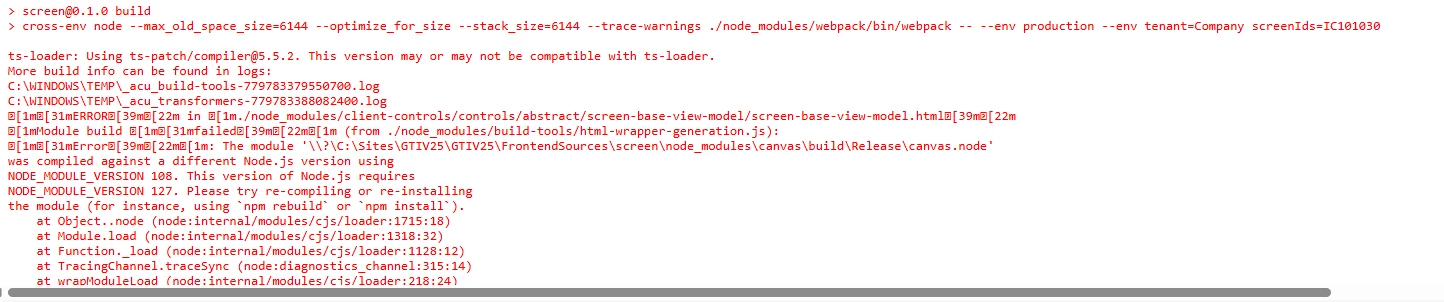
I think this is the main reason for the error
ts-loader: Using ts-patch/compiler@5.5.2. This version may or may not be compatible with ts-loader.
I have about 20 instances of MANY build versions as my snapshots are being restored into the build of the client’s snapshots.
In google, the AI tells me that I should use NVM to manage my active node.js version. The error seems to have something to do with typescript.
For sake of argument, say I am able to get my active version of node.js / typescript to match the instance I am publishing into. Before I spend hours trying to resolve this, has anyone had this issue and did you resolve it?
Secondly, IF this is truly the issue, does that mean when I provide my customization package to my customer, I have to know what version they are using? And, how would I get that?
I know it is early in the process to deploy MUI screens, but we are getting close to MUI going live.
I would love it if someone else has solved this and I don’t have to become a npm/Node.js guru to deploy my customizations to my customers.
Thanks in advance for any insights.
Read more here: Source link